Pulling Kubernetes secrets from Bitwarden with External Secrets Operator
For a long time my homelab secrets workflow was “type kubectl create secret and try not to lose the value.” That works until you rebuild the cluster, change something across many namespaces, or forget which Deployment is the source of truth for a token.
I finally replaced that pattern with External Secrets Operator (ESO) pointed at Bitwarden Secrets Manager. Bitwarden is the canonical secret store; Kubernetes gets normal Secret objects generated from it.
This post is mostly a future reference for the Bitwarden side, which has a few non-obvious clicks I do not want to figure out next time.
Why Bitwarden Secrets Manager
I evaluated a few backends: AWS Secrets Manager, AWS Systems Manager Parameter Store, Sealed Secrets, OpenBao, and Bitwarden Secrets Manager. Constraints from my homelab:
- Cost. Anything with per-secret or per-API-call billing is hard to reason about at homelab volume. I want a flat free tier or a clear monthly cap.
- Network. I do not want every workload reaching out to some remote server. Either the secrets need to flow through a cluster-local cache, or the backend itself needs to live near the cluster.
- Operability. I do not want to run a stateful secret store myself if I can avoid it. That ruled out OpenBao which I was considering for now.
Bitwarden Secrets Manager fit because it is a separate product from the password manager but still lives in the same Bitwarden organization. The free plan was enough for my homelab at the time of setup, and ESO has first-class support for it through the bitwardensecretsmanager provider.
How the pieces fit
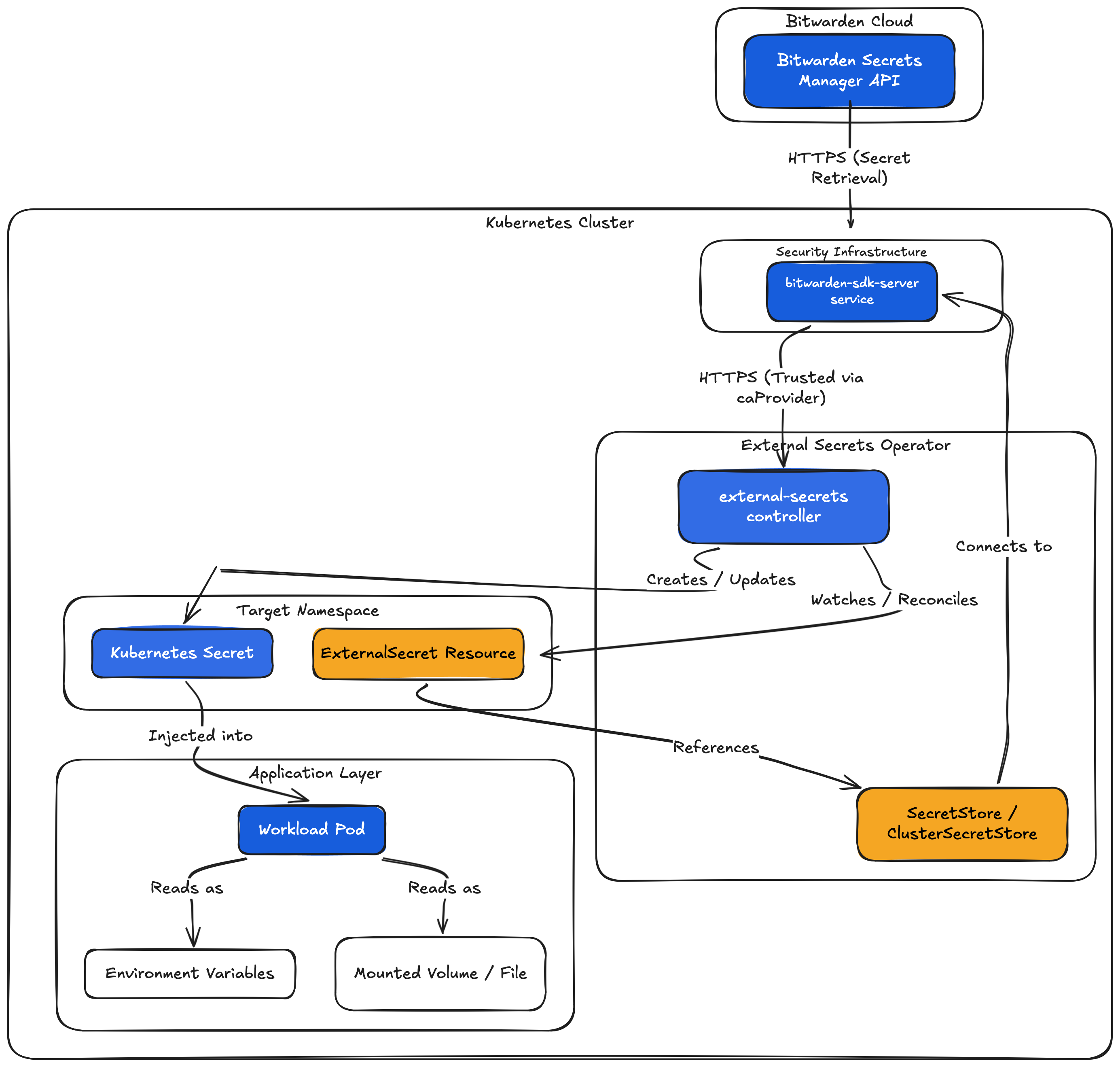
A workload never knows about Bitwarden. It mounts a normal Kubernetes Secret. ESO keeps that Secret in sync with the upstream value on a refresh interval, defaulting to one hour unless the ExternalSecret says otherwise.
Bitwarden side
This is the section I am writing this post for. The Bitwarden Secrets Manager UI is a different app from the password manager, with its own data model, and the click path is not obvious if you are coming in cold.
1. Confirm Secrets Manager is enabled for the org
Open https://vault.bitwarden.com, log in, then go to Settings > Subscription. If you only see Password Manager line items, click Add Secrets Manager. Check the current Bitwarden Secrets Manager plan limits, because pricing and plan details can change.
2. Switch to the Secrets Manager UI
Use the product picker in the top-left, next to the Bitwarden logo, then select Secrets Manager. The URL changes to vault.bitwarden.com/#/sm/<org-id>/.... Same organization, different app, different schema.
3. Create a project
Go to Projects > New project. Name it something durable like homelab. Projects are the unit of access control: machine accounts get permission per project, not per secret.
After creating the project, the URL is https://vault.bitwarden.com/#/sm/<org-id>/projects/<project-id>. Save both UUIDs. You will paste them into the ClusterSecretStore later.
4. Create a machine account
Go to Machine accounts > New machine account. Name it for the consumer, such as k8s-eso. A machine account is the identity ESO uses to talk to the API.
5. Grant the machine account access to the project
Open the machine account, go to its Projects tab, and assign the homelab project. Read access is enough for pull-only sync. Use write access only if you plan to use ESO PushSecret.
If you skip this, the machine account can authenticate to the API, but secret lookups fail because no project is in scope. In practice that can look like failed to get secret: API error: [404 Not Found], which is not especially friendly.
6. Generate an access token
In the same machine account, go to Access tokens > New access token. Name it for the environment, set an expiration that matches your rotation policy, and copy the token immediately. It is shown exactly once. If you lose it, generate a new one; there is no way to retrieve it.
7. Drop a test secret in
Go to Secrets > New secret. Name it eso-test, set the value to hello-world, and assign it to the homelab project. An unassigned secret is invisible to the machine account regardless of project access on the machine account itself. Save the secret and grab the secret UUID from the URL.
You should now have four values:
| Value | Where it goes |
|---|---|
| Org UUID | ClusterSecretStore.spec.provider.bitwardensecretsmanager.organizationID |
| Project UUID | ClusterSecretStore.spec.provider.bitwardensecretsmanager.projectID |
| Access token | Secret/bitwarden-access-token (manual, never in Git) |
| Test secret UUID | ExternalSecret.spec.data[].remoteRef.key |
ESO can reference Bitwarden secrets by UUID or name, but UUIDs are safer because names are not guaranteed to be unique. If you rename the secret in Bitwarden, the UUID stays and the ExternalSecret keeps working. If you delete and recreate it, the UUID changes and the ExternalSecret needs an update.
Cluster side
In order to set up Kubernetes resources, I use ArgoCD. I commit the configuration values for the upstream helm chart and ArgoCD deploys the chart with my values. Check out a previous post if you would like to walk through how to set up a similar pattern with ArgoCD.
A standard multi-source Argo CD app has three pieces: the upstream Helm chart, values from Git, and a templates directory:
argo-apps/apps/external-secrets/
  app.yaml
  values.yaml
  templates/
    bitwarden-sdk-tls-certificate.yaml
    bitwarden-cluster-secret-store.yaml
The Helm chart deploys the controller, webhook, cert controller, and the bitwarden-sdk-server subchart. Values keep it deliberately small:
installCRDs: true

bitwarden-sdk-server:
  enabled: true
  resources:
    requests:
      cpu: 10m
      memory: 64Mi

# Metrics and ServiceMonitor wiring omitted here.
The interesting part is the SDK server’s TLS. The Bitwarden provider talks to bitwarden-sdk-server over HTTPS, and ESO validates that certificate through caBundle or caProvider. You can self-sign manually, but if the cluster already has cert-manager, let it own the certificate lifecycle. Check out a previous post to see how I set up cert-manager with my AWS DNS domain.
Letting cert-manager mint the SDK server cert
A self-signed Issuer plus a Certificate with the right SANs replaces the manual OpenSSL bootstrap:
apiVersion: cert-manager.io/v1
kind: Issuer
metadata:
  name: bitwarden-sdk-selfsigned
  namespace: external-secrets
spec:
  selfSigned: {}
---
apiVersion: cert-manager.io/v1
kind: Certificate
metadata:
  name: bitwarden-sdk-server
  namespace: external-secrets
spec:
  secretName: bitwarden-tls-certs
  issuerRef:
    name: bitwarden-sdk-selfsigned
    kind: Issuer
  dnsNames:
    - bitwarden-sdk-server
    - bitwarden-sdk-server.external-secrets.svc
    - bitwarden-sdk-server.external-secrets.svc.cluster.local
  duration: 87600h # 10y, internal cert trusted through caProvider
  renewBefore: 8760h # 1y
  privateKey:
    algorithm: RSA
    size: 4096
cert-manager produces Secret/bitwarden-tls-certs with tls.crt, tls.key, and ca.crt. ESO references the same secret as a caProvider, so it trusts the certificate chain. Renewal is automatic.
Tradeoff: this app now depends on cert-manager being healthy before it can sync. If cert-manager is down, the SDK server pod can block on its volume mount and ClusterSecretStore will report NotReady. For a homelab that is fine; for production, weigh the dependency carefully.
The ClusterSecretStore
apiVersion: external-secrets.io/v1
kind: ClusterSecretStore
metadata:
  name: bitwarden
spec:
  provider:
    bitwardensecretsmanager:
      apiURL: https://api.bitwarden.com
      identityURL: https://identity.bitwarden.com
      bitwardenServerSDKURL: https://bitwarden-sdk-server.external-secrets.svc.cluster.local:9998
      organizationID: <org-uuid>
      projectID: <project-uuid>
      caProvider:
        type: Secret
        name: bitwarden-tls-certs
        key: ca.crt
        namespace: external-secrets
      auth:
        secretRef:
          credentials:
            name: bitwarden-access-token
            key: token
            namespace: external-secrets
Three references all land in the external-secrets namespace: the access token secret, the CA cert secret, and the SDK server URL. ClusterSecretStore is cluster-scoped, so every namespaced reference must be fully qualified.
Including projectID scopes the store to one project. Omitting it widens the store to every project the machine account can read. I prefer one project and one machine account per environment; it keeps blast radius obvious.
Bootstrapping the access token without leaking it to history
kubectl create namespace external-secrets

# macOS: read from clipboard, strip whitespace, never pass the token as an arg
kubectl -n external-secrets create secret generic bitwarden-access-token \
  --from-file=token=<(pbpaste | tr -d '[:space:]')

pbcopy </dev/null

kubectl -n external-secrets get secret bitwarden-access-token \
  -o jsonpath='{.data.token}' | base64 -d | wc -c
If you are not on macOS, read -rs BW_TOKEN works equivalently. The important part is not putting the token directly in shell history.
Using a secret
The ExternalSecret is the per-namespace consumer. Apply it wherever you need the value to land:
apiVersion: external-secrets.io/v1
kind: ExternalSecret
metadata:
  name: my-app-api-key
  namespace: apps
spec:
  refreshInterval: 1h
  secretStoreRef:
    kind: ClusterSecretStore
    name: bitwarden
  target:
    name: my-app-api-key
  data:
    - secretKey: api-key
      remoteRef:
        key: <bitwarden-secret-uuid>
ESO writes Secret/my-app-api-key in apps, with key api-key, value pulled from the Bitwarden secret with the matching UUID. Mount it into your workload as you would any other Kubernetes secret.
The refreshInterval controls how often ESO re-pulls. If you need a faster sync after rotating a value upstream, annotate to force it:
kubectl -n apps annotate externalsecret my-app-api-key \
  force-sync=$(date +%s) --overwrite
Production notes
For production, think carefully about tenancy and rotation. A ClusterSecretStore is convenient, but it allows any namespace with permission to create ExternalSecret resources to request data from that store. If that is too broad, use namespace-scoped SecretStore resources, separate Bitwarden projects, separate machine accounts, or ESO controller classes.
The Bitwarden access token is still a bootstrap secret in the cluster. Keep Kubernetes secret encryption enabled, restrict RBAC around Secret and ExternalSecret objects, and rotate the machine account token on a schedule you can actually keep.
Verification
# operator and SDK server
kubectl -n external-secrets get pods
kubectl -n external-secrets get certificate bitwarden-sdk-server

# the store is happy
kubectl get clustersecretstore bitwarden
# NAME        AGE   STATUS   CAPABILITIES   READY
# bitwarden   1m    Valid    ReadWrite      True

# end-to-end with a test ExternalSecret
kubectl apply -f /tmp/eso-test.yaml
kubectl -n default get externalsecret eso-test
# NAME       STORETYPE            STORE       REFRESH INTERVAL   STATUS         READY   LAST SYNC
# eso-test   ClusterSecretStore   bitwarden   1h                 SecretSynced   True    6s

kubectl -n default get secret eso-test -o jsonpath='{.data.hello}' | base64 -d
# hello-world
If the ExternalSecret is Ready=False:
SecretSyncedError ... [404 Not Found]: the machine account is not assigned to the secret’s project, or the secret is not assigned to a project the machine account can see.SecretSyncedError ... [401 Unauthorized]: the access token is wrong, expired, or revoked. Recreate the bootstrap secret.failed to perform http request, ... connection refused: the SDK server pod is not running. Checkkubectl -n external-secrets get podsandkubectl -n external-secrets logs -l app.kubernetes.io/name=bitwarden-sdk-server.
What you get
A clean handoff between the secret authority and the consumer. To rotate a credential, change it in Bitwarden; every ExternalSecret referencing it picks up the new value within refreshInterval. To onboard a new app to a managed credential, write an ExternalSecret. To audit who reads what, the access happens through a machine account whose token you control.
The cluster never holds long-lived API credentials in YAML. The only secret in the cluster that is not itself an ExternalSecret is the bootstrap access token, and rotating that token is one cluster-side update.
Sources
- External Secrets Operator
- Bitwarden Secrets Manager
- AWS Secrets Manager
- AWS Systems Manager Parameter Store
- Sealed Secrets
- OpenBao
- Bitwarden Secrets Manager plan limits
- cert-manager
- ESO Bitwarden provider documentation
- ESO ExternalSecret API documentation
- ESO API specification for
caProvider - bitwarden-sdk-server
- Argo CD multi-source applications