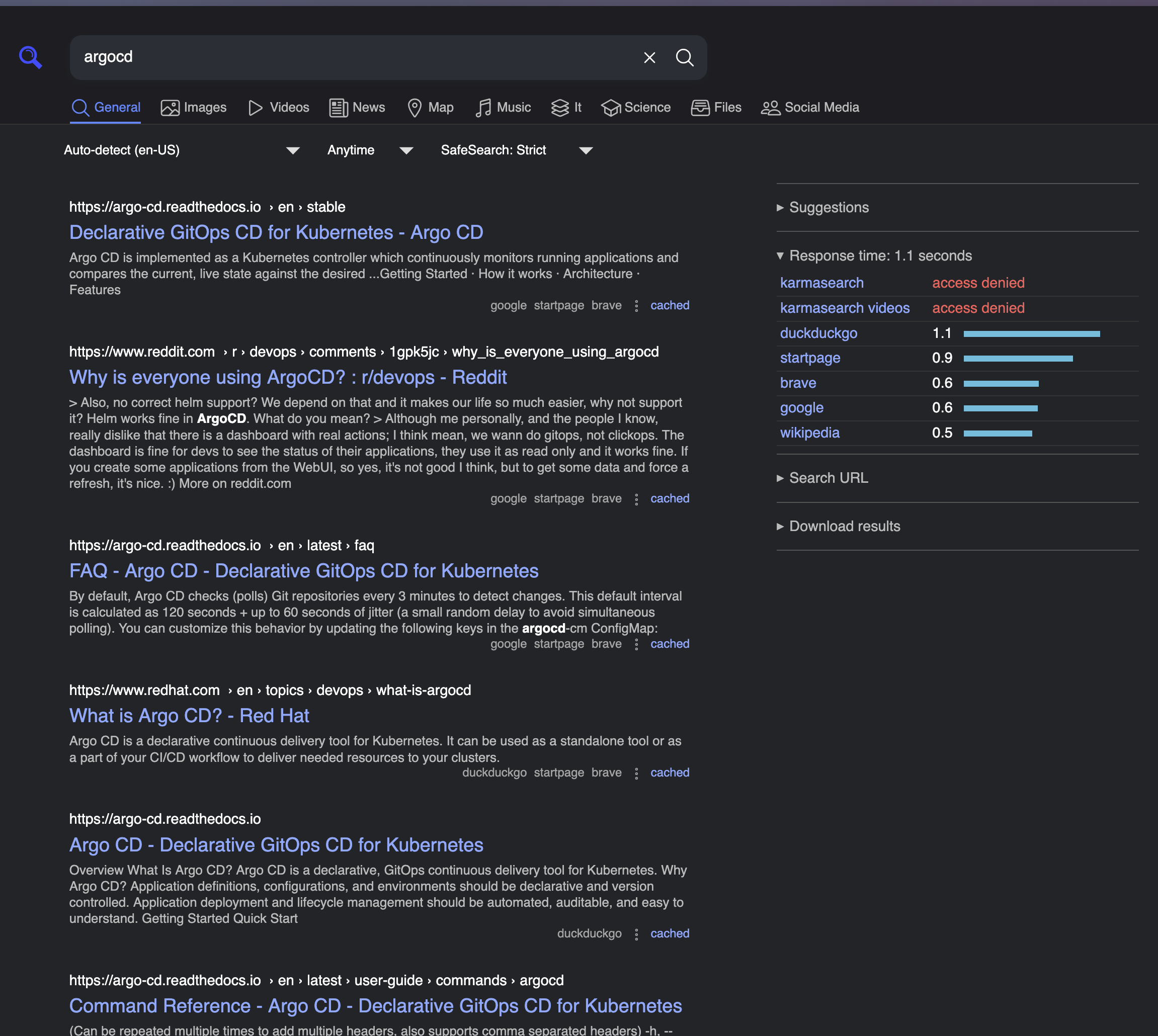
Running SearXNG as an alternative search engine
I have been getting increasingly frustrated using search engines such as Google where now there are just sponsored advertisements everywhere. Even though I use a more privacy focused search engine, Startpage, there are still sponsored results to comb through. I understand they need to make money but when I want to find information it is already time consuming to review multiple results even without ads.
SearXNG is a privacy-respecting metasearch engine: instead of crawling the web itself, it asks other search engines for results and presents them through one interface. That makes it a nice homelab service. You get a familiar search box, but your browser is not handing every query directly to one commercial search provider. I am really blown away by this software, I wish I had this set up years ago.
I recently adapted the official SearXNG container installation for my ArgoCD app-of-apps repo. The upstream project now recommends a simple compose template from the main searxng/searxng repository. The older searxng-docker repo and the official Helm chart are archived, so I chose plain Kubernetes manifests managed by ArgoCD.
Why self-host search
Traditional search engines are convenient, but they are also built around personalization, advertising, and long-lived user profiles. A private SearXNG instance takes a different approach:
- It aggregates results from many engines.
- It does not profile users.
- It avoids sending cookies to upstream search providers.
- It can proxy image results.
- It hides search queries from result pages through its result-link handling.
- A private instance means I control the code, configuration, logs, and access path.
There are tradeoffs. Results may be less personalized, and a small private instance can still run into upstream rate limits if it is abused or exposed too broadly. That is why the deployment includes Valkey and enables SearXNG’s limiter. You may not like it if you are impatient, when this ran on a Raspberry Pi 5, each search took at least 1 second to return results.
If you already self-host tools like Home Assistant, this is a trivial add to your self-hosting collection.
Compose model
The current official compose template is essentially two services:
core: the SearXNG web app, usingdocker.io/searxng/searxngvalkey: the rate-limit/cache companion, usingdocker.io/valkey/valkey:9-alpine
It also persists two paths:
/etc/searxngfor configuration such assettings.yml/var/cache/searxngfor cache data such as favicons
Docker Compose
For most people, Docker Compose is the easiest way to run SearXNG. The official container instructions use a compose file, a .env file, and a mounted config directory. For this example, keep everything in one project directory:
searxng-compose/
  docker-compose.yml
  .env
  searxng/
    settings.yml
Create docker-compose.yml:
services:
  searxng:
    image: docker.io/searxng/searxng:latest
    restart: unless-stopped
    ports:
      - '8080:8080'
    environment:
      - SEARXNG_BASE_URL=http://localhost:8080/
      - SEARXNG_SECRET=${SEARXNG_SECRET}
      - SEARXNG_VALKEY_URL=valkey://valkey:6379/0
    volumes:
      - ./searxng:/etc/searxng
      - searxng-cache:/var/cache/searxng
    depends_on:
      - valkey

  valkey:
    image: docker.io/valkey/valkey:9-alpine
    restart: unless-stopped
    command: valkey-server --save 30 1 --loglevel warning
    volumes:
      - valkey-data:/data

volumes:
  searxng-cache:
  valkey-data:
Generate a secret in .env:
printf 'SEARXNG_SECRET=%s\n' "$(openssl rand -hex 32)" > .envCreate searxng/settings.yml:
use_default_settings: true

general:
  debug: false
  instance_name: 'Home Search'

search:
  safe_search: 2
  autocomplete: 'duckduckgo'
  formats:
    - html

server:
  secret_key: 'overridden-by-SEARXNG_SECRET'
  limiter: true
  image_proxy: true

valkey:
  url: valkey://valkey:6379/0
Start the stack:
docker compose up -dThen open http://localhost:8080/. If you run it behind a reverse proxy, update SEARXNG_BASE_URL to the public URL before starting the containers.
Friendly hostname
Using localhost:8080 is fine for testing, but a friendly name is nicer for daily use. For a private homelab URL such as https://search.home.arpa/, you need two things:
- A DNS record, or a local hosts-file entry, that points
search.home.arpato the machine running SearXNG or to your reverse proxy. - A reverse proxy or ingress that accepts requests for
search.home.arpaand forwards them to the SearXNG container or service.
If you use Docker Compose, the reverse proxy forwards traffic to http://searxng:8080 when it runs on the same Docker network, or to http://<docker-host-ip>:8080 from another host. In that setup, change the compose environment variable to:
- SEARXNG_BASE_URL=https://search.home.arpa/For Kubernetes, the same idea applies through an ingress host. The DNS name points to the ingress controller, and the ingress routes search.home.arpa to the SearXNG service.
Kubernetes version
I ended up deploying SearXNG onto my k3s cluster. My Kubernetes version keeps the same shape as docker compose:
Deployment/searxngStatefulSet/searxng-valkeyConfigMap/searxng-config- one PVC for SearXNG cache
- one PVC for Valkey data
- a ClusterIP service, a Valkey service, and an ingress
ArgoCD layout
In my repo the app lives here:
argo-apps/apps/searxng/
  app.yaml
  README.md
  templates/
    configmap.yaml
    deployment.yaml
    ingress.yaml
    pvc.yaml
    service.yaml
    valkey-statefulset.yaml
The root ArgoCD app is already configured to include only argo-apps/apps/*/app.yaml, so adding searxng/app.yaml enrolls the app without pulling in legacy manifests.
Kubernetes configuration
The SearXNG config uses the upstream-recommended use_default_settings: true style from the settings template:
use_default_settings: true

general:
  debug: false
  instance_name: 'Home Search'

search:
  safe_search: 2
  autocomplete: 'duckduckgo'
  formats:
    - html

server:
  secret_key: 'overridden-by-SEARXNG_SECRET'
  limiter: true
  image_proxy: true

valkey:
  url: valkey://searxng-valkey:6379/0
The real secret key is not committed. The deployment reads it from Secret/searxng-secret:
kubectl create namespace apps
kubectl -n apps create secret generic searxng-secret \
  --from-literal=SEARXNG_SECRET="$(openssl rand -hex 32)"
I also set SEARXNG_BASE_URL to the ingress URL so generated links line up with the public address:
- name: SEARXNG_BASE_URL
  value: https://search.home.arpa/
Validation
Before syncing in ArgoCD, I validate the app manifest and the generated Kubernetes resources client-side:
kubectl apply --dry-run=client -f argo-apps/apps/searxng/app.yaml
kubectl apply --dry-run=client -f argo-apps/apps/searxng/templates/
After sync:
kubectl get pods -n apps -l app.kubernetes.io/instance=searxng
kubectl get ingress -n apps searxng-ingress
Then open https://search.home.arpa/, run a few searches, and add it to the browser as an OpenSearch provider.
Daily use
I like using it as my normal first search stop. For general web searches, docs, error messages, package names, and product research, it is usually enough. If one query does not return what I need, I can still fall back to a specific upstream search engine. The nice part is that SearXNG becomes the default path, and the commercial search engines become the exception instead of the habit.
It also works well as a shared household or homelab search page. Put the friendly URL somewhere easy to remember, such as https://search.home.arpa/, and any device on the network can use the same private search instance without each browser needing much setup.
This may seem like just another self-hosted app but I am really getting a lot of use out of this one, I mean Google has been my top used site for decades.