Self-hosting a Gitea Actions runner
I already use Gitea for private Git repositories in the homelab. It is lightweight, easy to keep behind my own reverse proxy, and good enough for the personal infrastructure repos that do not need to live on GitHub. The next piece is CI.
Gitea has an Actions-compatible runner called act_runner. It is not GitHub Actions with a different logo, but for the basic workflow I want, it is close enough: check out the repo, run lint/build/test commands, and report the result back to Gitea.
This post is the setup I am using for a small self-hosted runner on a Docker host. It is meant for private repositories I control. A runner executes code from repositories, so I would not connect this to untrusted public pull requests without stronger isolation.
What this adds
The flow is simple:
Gitea repo
  .github/workflows/build.yaml
        |
        v
Gitea Actions
        |
        v
Docker host running gitea/act_runner
        |
        v
Job containers started through Docker
The runner process stays connected to the Gitea instance and waits for work. When a workflow is queued, the runner starts the job and uses Docker for the execution environment.
Prerequisites
Before setting up the runner:
- A working Gitea instance.
- Actions enabled in Gitea.
- Docker installed on the runner host.
- A Gitea repository with a
.github/workflows/directory. - A registration token from Gitea.
If Actions are not enabled yet, check the Gitea config first. In app.ini, the relevant section is:
[actions]
ENABLED = true
Restart Gitea after changing the config.
Get a registration token
In the Gitea web UI, go to the runner settings and create or copy a runner registration token. The exact location depends on whether the runner should be scoped to the whole instance, an organization, or one repository.
For my homelab use case, an instance-scoped runner is usually enough. It limits where the runner can be used and keeps the blast radius smaller if I later add a workflow that does something dumb.
Save the token in an .env file next to the compose file:
GITEA_RUNNER_REGISTRATION_TOKEN=replace-meDo not commit this file.
Generate a runner config
Create a directory for the runner:
mkdir -p gitea-runner/data
cd gitea-runner
Generate the default config:
docker run --rm \
  --entrypoint='' \
  docker.io/gitea/act_runner:latest \
  act_runner generate-config > config.yaml
The generated file is a useful starting point. I keep it beside the compose file so changes to runner behavior are explicit.
The main settings I care about are capacity and Docker access. For a small host, keep capacity low:
runner:
  capacity: 1

container:
  network: bridge
One job at a time is boring, but it prevents the CI runner from competing with the rest of the homelab.
Docker Compose
Here is the compose file:
services:
  gitea-runner:
    image: docker.io/gitea/act_runner:latest
    container_name: gitea-runner
    restart: unless-stopped
    environment:
      GITEA_INSTANCE_URL: https://gitea.example.com
      GITEA_RUNNER_REGISTRATION_TOKEN: ${GITEA_RUNNER_REGISTRATION_TOKEN}
      GITEA_RUNNER_NAME: homelab-docker-runner
      GITEA_RUNNER_LABELS: ubuntu-latest:docker://node:24-bookworm,linux:host
      CONFIG_FILE: /config.yaml
    volumes:
      - ./data:/data
      - ./config.yaml:/config.yaml:ro
      - /var/run/docker.sock:/var/run/docker.sock
Start it:
docker compose up -dThen check the logs:
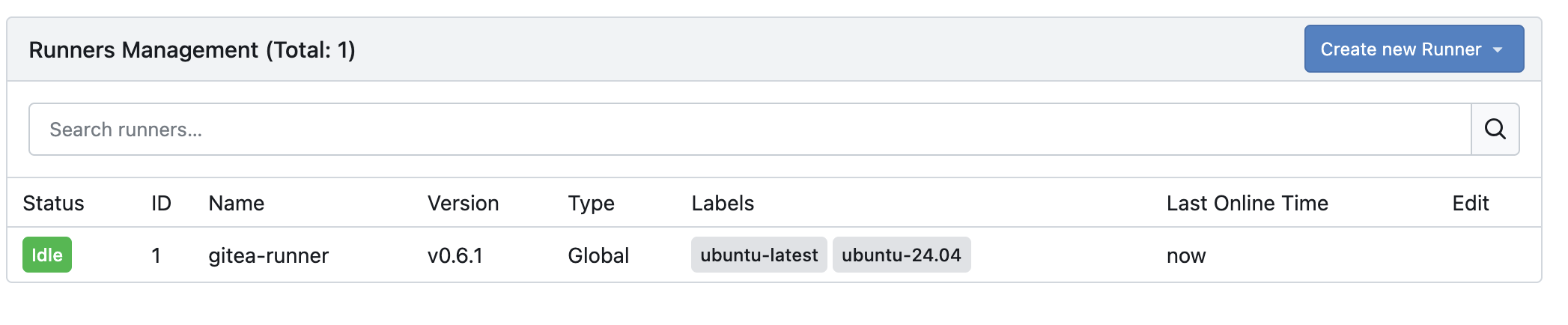
docker compose logs -f gitea-runnerThe runner should register itself and appear in Gitea’s runner list.
Labels
The labels are how workflows decide where to run:
GITEA_RUNNER_LABELS=ubuntu-latest:docker://node:24-bookworm,linux:hostWith that label set:
runs-on: ubuntu-lateststarts a job container fromnode:24-bookworm.runs-on: linuxruns directly on the runner host.
I prefer Docker-backed labels for most jobs. Host labels are useful for special cases, but they remove an isolation boundary.
A first workflow
CI workflows live under .github/workflows/. This example is for a Node project:
name: build

on:
  push:
    branches:
      - main
  pull_request:

jobs:
  build:
    runs-on: ubuntu-latest
    steps:
      - uses: actions/checkout@v4

      - name: Install dependencies
        run: npm ci

      - name: Lint
        run: npm run lint

      - name: Build
        run: npm run build
Commit that file and push it to Gitea. The Actions tab should show a queued run, then the runner should pick it up.
The Docker socket warning
The compose file mounts /var/run/docker.sock into the runner container. That is convenient, but it is also powerful. A job that can talk to the Docker socket can usually become root on the host.
For my setup, that means:
- Use this runner for private repositories only.
- Keep the runner scoped as narrowly as possible.
- Do not run workflows from untrusted pull requests.
- Keep capacity low so one bad job does not starve the host.
- Prefer job containers over
hostlabels.
This is the same general concern as any self-hosted CI runner. The runner is infrastructure, not just another app container.
Updating the runner
Because the runner is a single container, updates are straightforward:
docker compose pull
docker compose up -d
docker image prune
After an update, check the runner list in Gitea and run a small workflow before trusting it with larger jobs.
Troubleshooting
If a job never starts, check:
- The runner is online in Gitea.
- The workflow’s
runs-onvalue matches a configured runner label. - The registration token was valid when the runner first started.
- Docker is available on the runner host.
- The runner container can reach the Gitea URL.
If checkout fails, verify that the workflow can reach the repository URL that Gitea gives it. In a homelab, split DNS or internal-only hostnames can cause surprises.
Next steps
This gets the basic runner online. The next improvements I want to test are:
- A dedicated low-privilege runner host.
- Renovate and container build workflows.
- A cache directory for npm and container layers.
- Separate runners for trusted infrastructure repos and throwaway experiments.
For now, I have unlocked the ability to create CI jobs that run entirely in my homelab.
Disclaimer: I used an LLM to assist with this work and post. Opinions expressed are my own.