Running Hermes Agent on Kubernetes with Ollama and Telegram
I wanted a local agent that was available somewhere more convenient than a terminal window. I never posted about OpenClaw because there was so much overbearing hype around it during the start of 2026. Like many others I set it up to try it out. I put it on a small virtual machine on my Proxmox cluster so that it would not have access to any sensitive files. I used my ChatGPT subscription to provide a model for OpenClaw. For a few weeks the updates worked fine but then it started breaking all the time. The novelty finally wore off in July 2026 when I asked it a question and nothing came back because it was broken again. I deleted the virtual machine with OpenClaw on it and I have been looking at alternative local agents.
Hermes Agent looked like a good fit: it has persistent memory, tool use, scheduled jobs, and a messaging gateway that supports Telegram. It can also use any OpenAI-compatible model endpoint, which meant it could reuse the Ollama deployment already running on the RTX 4090 in my k3s cluster. Now I realized I should just integrate it with my existing homelab infrastructure.
The upstream project publishes an official multi-architecture container, but it does not publish a Helm chart or Kubernetes manifests. This post covers the Kubernetes adaptation I ended up with: a single Hermes gateway managed by Argo CD, durable state on NFS, declarative model configuration, a local Gemma 4 model served by Ollama, and a Telegram token synchronized from Bitwarden through External Secrets Operator.
What ended up being challenging (for Codex + GPT 5.6 sol, not me) was container’s s6 init contract, enforcing its single-writer storage requirement, giving a 31B model enough context for agentic tool use, and keeping a powerful bot away from Kubernetes credentials and the host filesystem.
The final shape
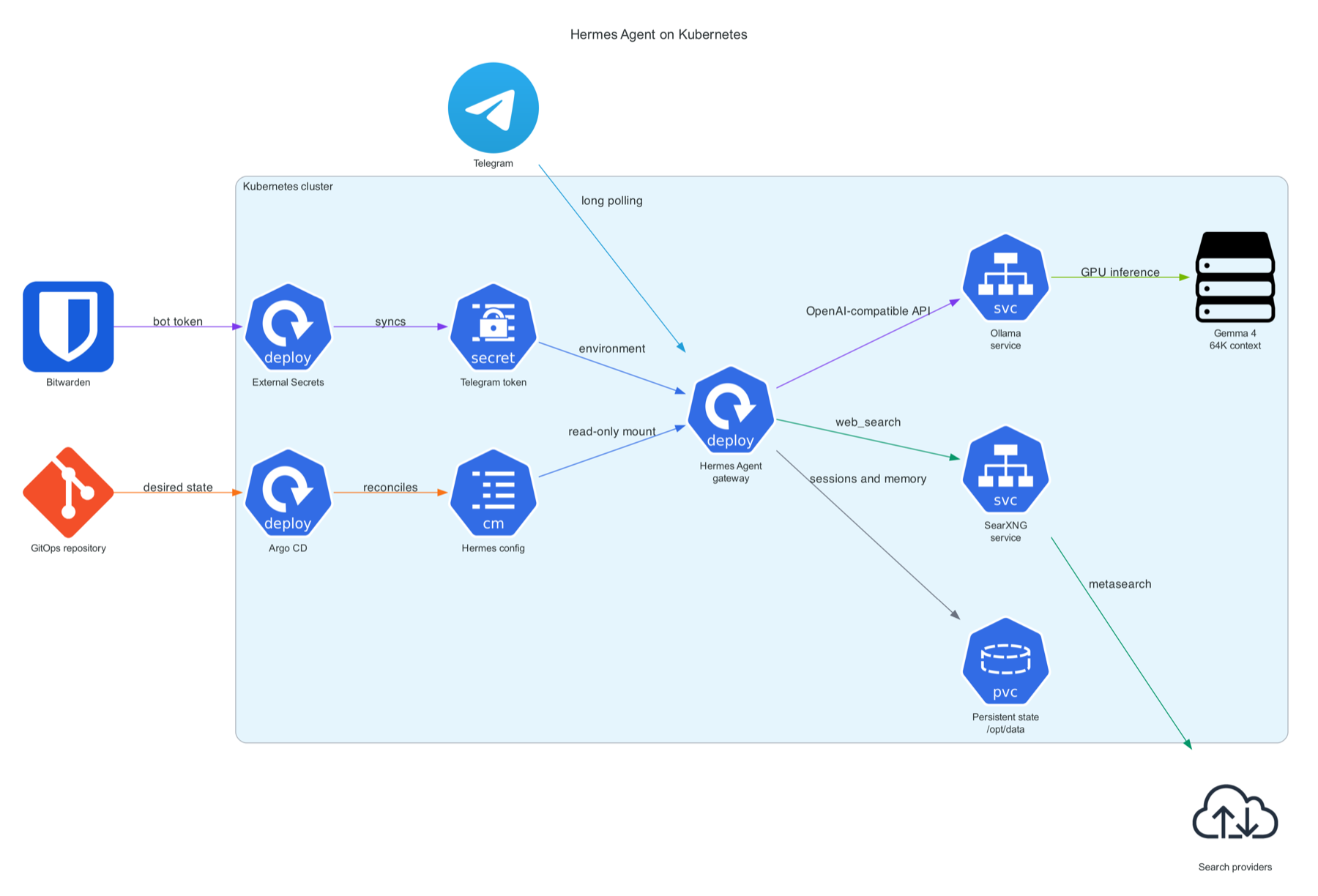
Hermes itself does not need a GPU. It runs on a normal worker and calls Ollama over the cluster network. Ollama stays pinned to the GPU node and is the only pod in this pair that requests nvidia.com/gpu.
Repository layout
The app follows the same Argo CD app-catalog layout as the rest of my repo:
argo-apps/apps/hermes-agent/
  app.yaml
  README.md
  templates/
    configmap.yaml
    deployment.yaml
    env-configmap.yaml
    external-secret.yaml
    pvc.yaml
The app.yaml is the Argo CD Application and the templates/ are all the Kubernetes objects that we need to deploy.
There is no upstream chart to reference, so the Argo CD Application points at the directory of plain Kubernetes resources:
apiVersion: argoproj.io/v1alpha1
kind: Application
metadata:
  name: hermes-agent
  namespace: argocd
spec:
  destination:
    namespace: apps
    server: https://kubernetes.default.svc
  project: default
  source:
    repoURL: https://git.example.com/aj/manifests.git
    targetRevision: main
    path: argo-apps/apps/hermes-agent/templates
  syncPolicy:
    automated:
      prune: true
      selfHeal: true
    syncOptions:
      - CreateNamespace=true
      - ServerSideApply=true
Adding app.yaml is enough for the root app to discover it because the root is restricted to apps/*/app.yaml. If you are not familiar with Argo CD “root” app or the “app of apps” pattern, you can apply the Application object with kubectl to get the same effect.
Preserve the official container contract
The official image is nousresearch/hermes-agent. It uses s6-overlay as PID 1 and expects /init to prepare the data directory, migrate configuration, reconcile profiles, and supervise the gateway. Replacing the image entrypoint with a Kubernetes command would bypass that setup.
The Deployment therefore supplies only arguments:
containers:
  - name: hermes-agent
    image: nousresearch/hermes-agent:v2026.7.7.2
    args:
      - gateway
      - run
Kubernetes appends args to the image’s existing entrypoint. The effective process chain remains /init, the Hermes wrapper, and finally gateway run.
Hermes stores everything mutable under /opt/data: configuration, sessions, memories, skills, cron jobs, logs, uploads, and subprocess home directories. The documentation explicitly warns against running two gateways against the same data directory, so this is a single-replica Deployment with a Recreate strategy:
spec:
  replicas: 1
  strategy:
    type: Recreate
The volume is a 10 GiB NFS-backed claim:
apiVersion: v1
kind: PersistentVolumeClaim
metadata:
  name: hermes-agent-data
  namespace: apps
spec:
  accessModes:
    - ReadWriteOnce
  storageClassName: nfs-client
  resources:
    requests:
      storage: 10Gi
ReadWriteOnce is not a substitute for the replica and rollout settings. It usually means one node, not necessarily one pod. The single-replica and Recreate settings are what prevent two gateway processes from writing state during an update.
Declarative Hermes configuration
I did not want the model setup to depend on clicking through a dashboard or running an onboarding wizard after every rebuild. Hermes has a useful feature for this called managed scope. Configuration mounted at /etc/hermes/config.yaml wins over the mutable user configuration in /opt/data, key by key.
The managed ConfigMap pins the local provider:
apiVersion: v1
kind: ConfigMap
metadata:
  name: hermes-agent-config-v1
  namespace: apps
immutable: true
data:
  config.yaml: |
    model:
      provider: custom
      default: gemma4-64k
      base_url: http://ollama.apps.svc.cluster.local:11434/v1
      api_mode: chat_completions
    security:
      redact_secrets: true
It is mounted read-only at /etc/hermes. Runtime state remains writable on the PVC, but a /model --global command cannot silently replace the cluster-managed provider.
I made the ConfigMap immutable and included a version in its name. When the managed configuration changes, I bump the name in both the ConfigMap and the Deployment. That creates a pod-template change, so Argo CD rolls the gateway and Hermes reads the new settings on startup. I want to prevent any process within the Hermes container modifying the config.yaml file.
Non-sensitive environment variables live in a second ConfigMap:
apiVersion: v1
kind: ConfigMap
metadata:
  name: hermes-agent-env-v1
  namespace: apps
immutable: true
data:
  S6_READ_ONLY_ROOT: '1'
  TELEGRAM_ALLOWED_USERS: '<telegram-user-id>'
Keeping this separate avoids treating the config.yaml data key as an environment variable when the Deployment uses envFrom.
Tune Ollama for agentic work
Hermes’ local Ollama guide recommends gemma4:31b because it supports tool calling. Smaller conversational models may answer a question, but an agent that cannot reliably emit tool calls cannot edit files, run commands, or browse the web.
The other important recommendation is context size. Agentic prompts include tool schemas, memory, conversation history, and tool results. Hermes recommends at least 64,000 tokens, while an ordinary Ollama model will start with a much smaller context.
The Ollama Helm chart can create a derived model from a Modelfile during startup:
ollama:
  gpu:
    enabled: true
    type: nvidia
    number: 1
  models:
    pull:
      - gemma4:31b
    create:
      - name: gemma4-64k
        template: |
          FROM gemma4:31b
          PARAMETER num_ctx 64000
    run:
      - gemma4-64k
A 31B model plus a 64K KV cache is tight on a 24 GiB RTX 4090. Ollama supports Flash Attention and KV-cache quantization, so I enabled both and kept only one model resident:
extraEnv:
  - name: OLLAMA_FLASH_ATTENTION
    value: '1'
  - name: OLLAMA_KV_CACHE_TYPE
    value: q8_0
  - name: OLLAMA_KEEP_ALIVE
    value: 24h
  - name: OLLAMA_MAX_LOADED_MODELS
    value: '1'
q8_0 uses roughly half the KV-cache memory of the default f16 with little quality loss. On this deployment, Ollama reported about 17.8 GiB of GPU model weights, roughly 3.3 GiB of KV cache, Flash Attention enabled, and a 64,000-token context. The model fit fully on the GPU and generated at about 9.6 tokens per second during a test.
Private web search with SearXNG
Hermes includes a native SearXNG web-search backend, so I connected it to the private SearXNG service that was already running in my cluster. The backend only needs the SearXNG base URL and a managed configuration key. I added the following to config.yaml:
web:
  search_backend: searxng
The non-sensitive environment ConfigMap supplies the in-cluster URL:
data:
  SEARXNG_URL: http://searxng.apps.svc.cluster.local
Hermes appends /search and requests JSON, which means SearXNG must explicitly enable JSON responses in settings.yml:
search:
  formats:
    - html
    - json
The other requirement was rate limiting. SearXNG’s API limits are intentionally strict, and I had already seen Open WebUI get blocked almost immediately. My SearXNG limiter exempts the k3s pod network in limiter.toml, so Hermes is trusted without relying on an individual pod IP that changes after rescheduling:
[botdetection.ip_lists]
pass_ip = [
  "10.0.0.0/16",
]
That CIDR is specific to my cluster and trusts every pod in the range. On another cluster, use its actual pod CIDR or route approved clients through a stable egress IP and allow only that address. SearXNG’s pass_ip setting takes priority over its other bot-detection checks.
Because both Hermes ConfigMaps are immutable, I bumped their names from v1 to v2 and updated the Deployment references. That changed the pod template, allowing Argo CD to roll Hermes and load the new search configuration. I verified the integration from inside the pod:
kubectl -n apps exec deployment/hermes-agent -- \
  python -m tools.web_tools
Hermes detected SearXNG as its search backend, and a native web_search call returned results from the private service. SearXNG provides search but not provider-backed web_extract; Hermes can still use its browser tools for page content, or a separate extraction provider can be configured.
Telegram without a public ingress
For an always-on homelab, Telegram’s default long-polling mode is convenient. Hermes makes outbound requests to the Telegram API, so there is no webhook, public DNS record, Service, or Ingress to maintain. It was very easy to set up and it works well in places with poor cell reception. That is why I chose Telegram bot as my primary interface for Hermes instead of something like Discord or Slack.
I created the bot through BotFather and stored the token as a raw value in Bitwarden Secrets Manager. The numeric Telegram user ID is an authorization identifier rather than a credential, so it stays in the non-secret environment ConfigMap. The bot token is synchronized through another Kubernetes application, External Secrets Operator:
apiVersion: external-secrets.io/v1
kind: ExternalSecret
metadata:
  name: hermes-agent-telegram
  namespace: apps
spec:
  refreshInterval: 1h
  secretStoreRef:
    kind: ClusterSecretStore
    name: bitwarden
  target:
    name: hermes-agent-telegram
    creationPolicy: Owner
    deletionPolicy: Retain
  data:
    - secretKey: bot-token
      remoteRef:
        key: <bitwarden-secret-uuid>
        conversionStrategy: Default
        decodingStrategy: None
        metadataPolicy: None
        nullBytePolicy: Ignore
The Deployment maps that generated key to the variable Hermes expects:
envFrom:
  - configMapRef:
      name: hermes-agent-env-v1
env:
  - name: TELEGRAM_BOT_TOKEN
    valueFrom:
      secretKeyRef:
        name: hermes-agent-telegram
        key: bot-token
The allowlist is important. A Telegram bot connected to an agent with terminal and file tools should never set GATEWAY_ALLOW_ALL_USERS=true. With TELEGRAM_ALLOWED_USERS set, every other account is denied unless it is explicitly paired later.
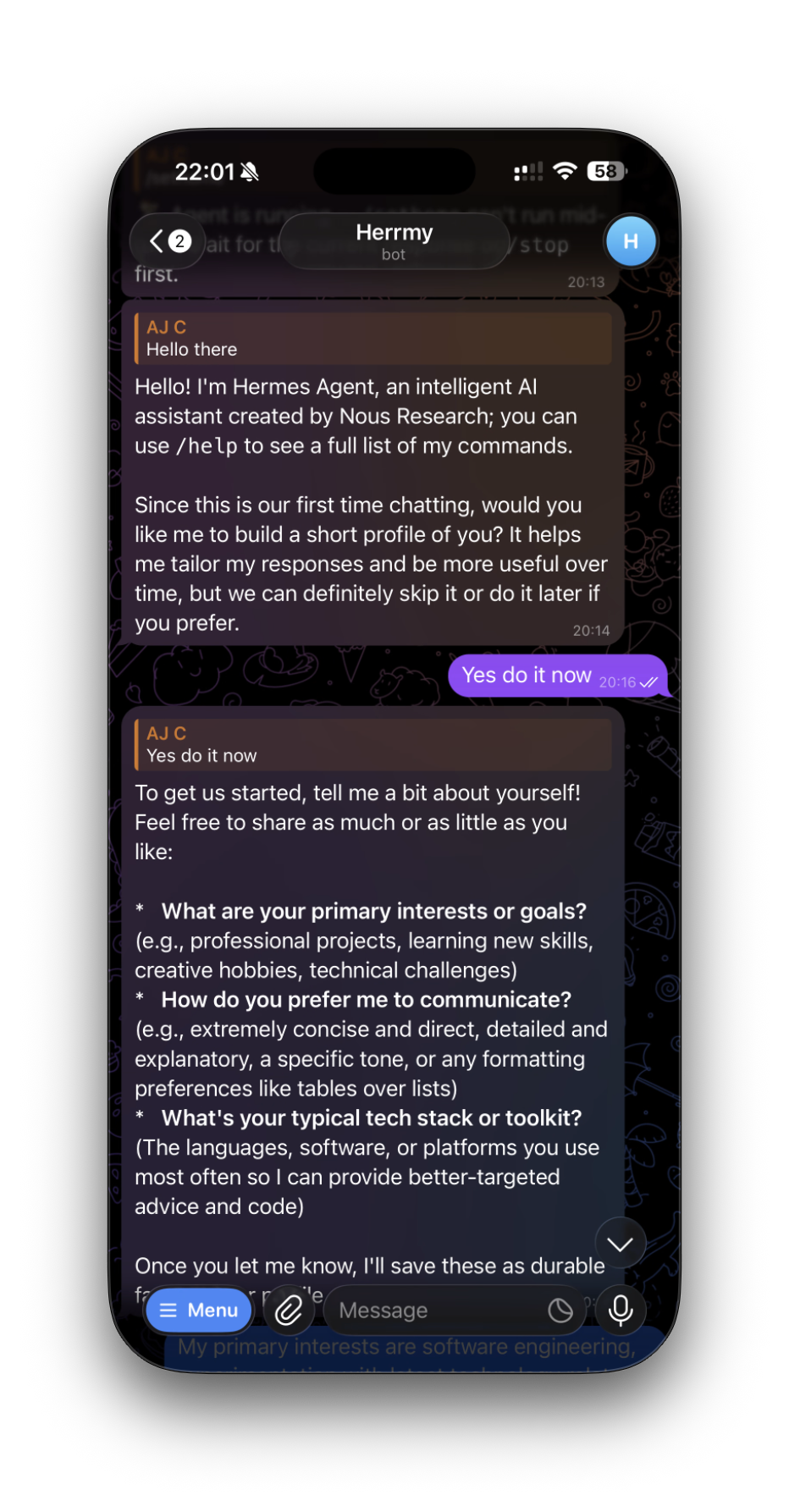
After deployment, Telegram still requires the user to open the bot and send /start. Bots cannot initiate a private chat; an attempted proactive message before /start returns Bad Request: chat not found.
Harden the pod
Hermes is intentionally powerful. The gateway can execute terminal and file tools, so I treated the pod as a zero-trust workload even though it does not mount the host.
The pod receives no Kubernetes service-account token and no automatic Service environment variables:
automountServiceAccountToken: false
enableServiceLinks: false
The container uses the runtime-default seccomp profile, cannot gain new privileges, and has a read-only root filesystem:
securityContext:
  seccompProfile:
    type: RuntimeDefault

containers:
  - name: hermes-agent
    securityContext:
      allowPrivilegeEscalation: false
      privileged: false
      readOnlyRootFilesystem: true
      capabilities:
        drop:
          - ALL
        add:
          - CHOWN
          - DAC_OVERRIDE
          - FOWNER
          - SETGID
          - SETUID
Those five capabilities are the minimum used by the upstream s6 startup path to initialize /opt/data and then drop supervised services to the hermes user. The agent process does not run as root after initialization.
A read-only root still needs a few writable runtime paths. They are bounded, memory-backed emptyDir volumes:
volumeMounts:
  - name: data
    mountPath: /opt/data
  - name: run
    mountPath: /run
  - name: tmp
    mountPath: /tmp
  - name: var-tmp
    mountPath: /var/tmp
  - name: shared-memory
    mountPath: /dev/shm
/dev/shm gets 1 GiB because Chromium and Playwright need more shared memory than the tiny container default. /run, /tmp, and /var/tmp have smaller limits. There are no hostPath volumes, runtime sockets, host PID/IPC/network namespaces, or GPU resources on the Hermes pod. Those apps allow the agent to work with a web browser.
This is defense in depth, not a mathematical guarantee against a container escape. Keeping k3s, containerd, and the host kernel patched remains part of the security boundary. Hermes also has full access to its own PVC and whatever outbound network destinations the cluster permits.
Rollout to my cluster
The manifests passed both client-side and server-side dry runs before merge:
kubectl apply --dry-run=server \
  -f argo-apps/apps/hermes-agent/templates/

helm template ollama ollama-helm/ollama \
  --version <chart-version> \
  --namespace apps \
  --values argo-apps/apps/ollama/values.yaml
Verification
The final checks covered the whole path rather than stopping when Argo CD said Healthy:
# GitOps state
kubectl -n argocd get application homelab-root hermes-agent ollama

# Workloads and storage
kubectl -n apps get deployment,pod,pvc,externalsecret \
  | grep -E 'hermes|ollama|NAME'

# Hermes sees the managed configuration
kubectl -n apps exec deployment/hermes-agent -- hermes config

# Ollama has the correct model resident on the GPU
kubectl -n apps exec deployment/ollama -- ollama ps

# Model discovery from the Hermes network namespace
kubectl -n apps exec deployment/hermes-agent -- \
  curl -fsS http://ollama.apps.svc.cluster.local:11434/v1/models

# Telegram gateway connection
kubectl -n apps exec deployment/hermes-agent -- \
  tail -n 100 /opt/data/logs/gateway.log
The live results showed:
- Argo CD root, Hermes, and Ollama applications
SyncedandHealthy. - Both Deployments available with zero container restarts.
- The NFS PVC bound and writable.
- The Bitwarden
ExternalSecretinSecretSyncedstate. - Managed model configuration loaded from
/etc/hermes. - The image root filesystem rejecting writes while
/opt/dataremained writable. - No service-account token mounted in the Hermes pod.
gemma4-64kresident at 64K context and 100% GPU execution.- A successful OpenAI-compatible chat-completions request from Hermes to Ollama.
- Telegram connected in polling mode with the command menu registered.
Monitoring
Hermes does not currently expose a native Prometheus/OpenMetrics endpoint. I am using normal Kubernetes metrics for readiness, restarts, CPU, memory, and network, plus NVIDIA DCGM metrics for the Ollama GPU. A blackbox check against a health endpoint or a small JSON exporter could be added later if I need Hermes-specific session metrics.
All of my k3s pod logs are sent to a Grafana Loki server where I can query for errors.
What I would change next
The current deployment is intentionally private: Telegram is the interface, and there is no Hermes Service or Ingress. If I add the OpenAI-compatible API or dashboard later, each will need explicit authentication before it is exposed.
I would also consider a NetworkPolicy that allows DNS, Telegram, and Ollama but blocks private cluster destinations by default. That requires care because an agent expected to browse the web needs broad outbound access, and a simplistic egress policy can either break tools or provide less isolation than it appears to.
For now, the useful outcome is straightforward: a Telegram message reaches a single hardened Hermes gateway, Hermes reasons with a local tool-capable Gemma 4 model on the 4090, and all durable state and configuration are managed by the same Kubernetes and GitOps workflows as the rest of the homelab.
Related posts
- A private AI stack on Kubernetes with the GPU Operator, Ollama, and Open WebUI
- Pulling Kubernetes secrets from Bitwarden with External Secrets Operator
- Running SearXNG as an alternative search engine