Running Qwen3.8 on Kubernetes with an RTX 4090
In A private AI stack on Kubernetes, I moved Ollama onto the RTX 4090 in my k3s cluster as an Argo CD app. Then, in Running Hermes Agent on Kubernetes, I set up a gemma4-64k model in Ollama so my Telegram-connected agent had enough context for tool use. It worked, though it was pretty slow at around 9.6 tokens per second.
This post is the follow-up to that setup. I replaced Gemma with Qwen3.8-27B, cleaned out the old models, pointed Hermes at the new one, and pushed the context window as far as the 4090 could handle. What I expected to be a quick two-line values change turned into a deeper debugging session involving:
- a model whose advertised 256K context window does not fit on a 24 GB card,
- a Helm chart option that would have deleted my model on every restart,
- an agent that would have quietly overridden my context limit, and
- a three-day-old process holding 23 GB of VRAM that nothing could kill.
By the end of it, I had a model running 100% on the GPU with a 116K-token context window at around 85 tokens per second. Here is how I got there.
Why Qwen3.8-27B
The qwen3.8:27b tag in the Ollama library is an 18 GB download: a 16.8 GB Q4_K_M GGUF file plus a 0.93 GB vision projector. (Q4_K_M is a quantization format that compresses the model’s weights down to roughly 4 bits per parameter so a 27-billion-parameter model can fit on a consumer GPU, while the vision projector is a small bundled adapter that lets the model process images.) It advertises a 256K context window, supports tool calling and vision, and includes multi-token prediction (MTP) for speculative decoding, a technique where the model guesses several upcoming tokens at once and verifies them in a single pass to speed up text generation.
What makes it interesting for a 24 GB GPU is its architecture. After pulling the model, running ollama show --verbose shows the architecture metadata:
qwen35.block_count                65
qwen35.full_attention_interval    4
qwen35.attention.head_count       24
qwen35.attention.head_count_kv    4
qwen35.attention.key_length       256
qwen35.context_length             262144
qwen35.ssm.state_size             128
Only every fourth layer uses full attention, which lets a layer look back at every earlier token and requires a KV (Key-Value) cache scratchpad in VRAM that grows with your conversation length. The remaining layers use linear attention (Gated DeltaNet), which folds past context into a small, fixed-size summary called the recurrent state, so only 16 of the 64 transformer layers need a KV cache that scales with context length. With 4 KV heads of dimension 256, the cache works out to:
| KV cache type | Per token | Per 64K tokens | Full 256K |
|---|---|---|---|
f16 |
64 KiB | 4 GiB | 16 GiB |
q8_0 |
34 KiB | 2.1 GiB | 8.5 GiB |
q4_0 |
18 KiB | 1.1 GiB | 4.5 GiB |
Those cache types control how many bits each cached value takes up: f16 (16-bit floating point) is the default, while q8_0 compresses entries to 8-bit integers, cutting cache memory nearly in half with minimal impact on quality.
The 65th block is the built-in MTP drafter. Ollama starts the runner with --spec-type draft-mtp and does not need a separate draft model file. That detail ended up mattering quite a bit once I started measuring VRAM.
The config change
Both Ollama and Hermes were already managed as Argo CD apps, so I made all of these changes in Git. The Ollama Helm values pull the base model, create a context-sized alias, and preload it on startup:
# argo-apps/apps/ollama/values.yaml
ollama:
  models:
    pull:
      - qwen3.8:27b
    create:
      - name: qwen3.8-116k:latest
        template: |
          FROM qwen3.8:27b
          PARAMETER num_ctx 118784
    run:
      - qwen3.8-116k
    clean: true

extraEnv:
  - name: OLLAMA_FLASH_ATTENTION
    value: '1'
  - name: OLLAMA_KV_CACHE_TYPE
    value: q8_0
  - name: OLLAMA_KEEP_ALIVE
    value: 24h
  - name: OLLAMA_MAX_LOADED_MODELS
value: '1'(OLLAMA_FLASH_ATTENTION enables a more memory-efficient attention algorithm that Ollama requires before it will quantize the KV cache to q8_0.)
That is the final version I landed on. My first commit used a 128K alias, and I will get to why I had to dial it back below.
clean: true and the missing tag
To clean up the old models on the persistent volume, I enabled the otwld/ollama chart’s models.clean option, which removes any model not declared in the Helm values. Before deploying, I rendered the chart and checked how it decides what to keep:
/bin/ollama list | awk 'NR>1 {print $1}' | while read model; do
  echo "qwen3.8:27b qwen3.8-116k:latest qwen3.8-116k:latest" | tr ' ' '\n' \
    | grep -Fqx "$model" || /bin/ollama rm "$model"
done
The keep-list uses each create entry’s name exactly as written, whereas ollama list always includes a tag. If I had named the alias qwen3.8-116k without the tag, ollama list would have printed qwen3.8-116k:latest, the grep match would have failed, and the chart would have deleted the model right after creating it on every pod start. Naming it qwen3.8-116k:latest avoids the mismatch. Inspecting the rendered script is the only reason I caught this before pushing it out.
Pin the context in Hermes too
Hermes tries to be helpful when talking to Ollama: it queries Ollama for the model’s maximum context length and sends that value as num_ctx on every request, overriding whatever the alias sets. For this alias, Hermes saw an advertised window of 131,072 tokens, which is more than the GPU can fit.
To prevent that, I pinned the same context length in the Hermes managed config:
model:
  provider: custom
  default: qwen3.8-116k
  base_url: http://ollama.apps.svc.cluster.local:11434/v1
  api_mode: chat_completions
  context_length: 118784
Because the Hermes ConfigMap (the Kubernetes object that stores the app’s config file) is immutable and versioned, I bumped its name to roll the pod. You want to keep the two context numbers in sync, since a request with a different num_ctx forces Ollama to reload the entire model.
The ghost in the GPU
Before committing the final config, I pulled the model into the running pod and tested loading it at 256K, 192K, and 128K to see how much would fit. Every attempt failed with the exact same error:
cudaMemGetInfo failed (out of memory), returning 0/0
llama-server terminated: signal: segmentation fault (core dumped)
Even 128K failed, which did not make sense for a 16 GB model. When I checked nvidia-smi, it showed 23,838 MiB of 24,564 MiB already in use, even though ollama ps reported that nothing was loaded. Checking the process list inside the pod explained what was going on:
PID  ELAPSED     RSS       COMMAND
  1  3-16:10:44  427476    /bin/ollama serve
267  3-16:10:37  17947192  /usr/lib/ollama/llama-server --model ...gemma4... -c 64000 ...
That was the old gemma4-64k runner, which had been running for three and a half days. Ollama’s scheduler had lost track of it, yet it was still holding onto almost all of the GPU’s VRAM. Running ollama stop did nothing, and then even kill failed:
$ kubectl -n apps exec deploy/ollama -- kill 267
kill: (267): Permission denied
This was root trying to kill another root process inside the same container, even with Linux’s CAP_KILL capability (the kernel permission that normally lets a process send signals to any other process) enabled. I ran a couple of quick checks to narrow down why it was being blocked:
$ kubectl -n apps exec deploy/ollama -- sh -c 'sleep 30 & kill $!; echo $?'
kill: Permission denied
1
$ kubectl -n apps exec deploy/ollama -- kill -0 1; echo $?
0
A shell could not even send SIGTERM (the standard polite-shutdown signal) to its own child process, yet signal 0 (which only checks if a process exists) worked fine. That kind of behavior points to a Linux Security Module (LSM), a kernel-level security framework that enforces rules beyond normal user permissions. Checking the AppArmor label (Ubuntu’s built-in LSM) gave it away:
$ kubectl -n apps exec deploy/ollama -- cat /proc/1/attr/current
cri-containerd.apparmor.d//&unconfined (enforce)
Containers on my Ubuntu 24.04 worker nodes show plain cri-containerd.apparmor.d. The //&unconfined suffix is a stacked label, meaning the kernel is applying two security profiles at once, and my GPU node happens to be the only machine in the cluster running Ubuntu 26.04 (kernel 7.0). From what I can tell, containerd’s default AppArmor profile only allows signals from a peer labeled exactly cri-containerd.apparmor.d. Under a stacked label, that rule stops matching, so the kernel blocks signals between processes inside the container.
The impact is bigger than just one stuck process. Because Ollama unloads a model by sending a signal to its runner, every unload on this node was silently failing:
- The pod starts and preloads the model.
- 24 hours later,
OLLAMA_KEEP_ALIVEexpires and Ollama tries to unload it. - The signal gets denied, so the runner keeps its VRAM while Ollama forgets it exists.
- The next request spawns a new runner, which immediately hits an out-of-memory error.
That meant Ollama on this node would break roughly a day after every restart. That is almost certainly what happened to Gemma, since its runner was 3.5 days old and well past the 24-hour keep-alive. My benchmarks just reproduced the leak on demand because switching between test models triggered an unload every time.
The fix only took one field in the Ollama Helm values. Kubernetes has supported appArmorProfile in the security context since version 1.30:
securityContext:
  appArmorProfile:
    type: Unconfined
This only disables the containerd AppArmor layer for the Ollama container, which already runs as root with default capabilities. It is a workaround until containerd ships a profile that handles stacked labels on Ubuntu 26.04, but once Argo CD synced the change, unloading models immediately started working:
$ ollama stop qwen3.8-116k; nvidia-smi --query-gpu=memory.used --format=csv,noheader
226 MiB
How much context actually fits
Based on the KV cache table earlier, I initially guessed I could fit about 128K at q8_0 with roughly a gigabyte to spare. Ollama loaded the 128K alias, and ollama ps reported:
NAME                 SIZE   PROCESSOR         CONTEXT
qwen3.8-128k:latest  18 GB  8%/92% CPU/GPU    131072
It did not crash, though; instead, it spilled over to the CPU. Ollama’s bundled llama-server runs with --fit on and a 1,024 MiB target margin, so when a model does not quite fit in VRAM, it offloads layers to system RAM and keeps going. In this case, two layers landed on the CPU and generation speed dropped to around 51 tokens per second.
Looking at the load log showed what my estimate missed:
| Component | VRAM | Did I plan for it? |
|---|---|---|
| Weights (Q4_K_M) | 15.6 GiB | Yes |
Main KV cache, q8_0, 128K |
4.25 GiB | Yes |
| Linear-attention recurrent state | 0.73 GiB | Yes |
| Main compute buffers | 0.78 GiB | Mostly |
| Vision projector | 1.13 GiB | No: llama-server reserves its worst case at load |
| MTP draft KV cache | 0.5 GiB | No: a separate cache that stays f16 |
| MTP draft compute buffers | 0.43 GiB | No |
The MTP drafter runs as a second context with its own KV cache, and since Ollama does not pass --spec-draft-type-k, that cache stays at f16 regardless of OLLAMA_KV_CACHE_TYPE. Between the drafter, the vision projector reservation, and the fit margin, roughly 3 GiB of VRAM was already spoken for that I had not accounted for.
With the AppArmor fix in place, I could finally swap context sizes freely and run benchmarks. Each run used a warm runner with thinking disabled and generated a ~300-token prose response:
num_ctx |
Placement | VRAM used | Generation |
|---|---|---|---|
| 98,304 (96K) | 100% GPU | 21.8 GiB | ~80 t/s |
| 106,496 (104K) | 100% GPU | 22.1 GiB | ~82 t/s |
| 114,688 (112K) | 100% GPU | 22.5 GiB | ~80 t/s |
| 118,784 (116K) | 100% GPU | 22.7 GiB | ~85 t/s |
| 122,880 (120K) | 6% / 94% | 22.7 GiB | ~63 t/s |
| 131,072 (128K) | 8% / 92% | 22.7 GiB | ~51 t/s |
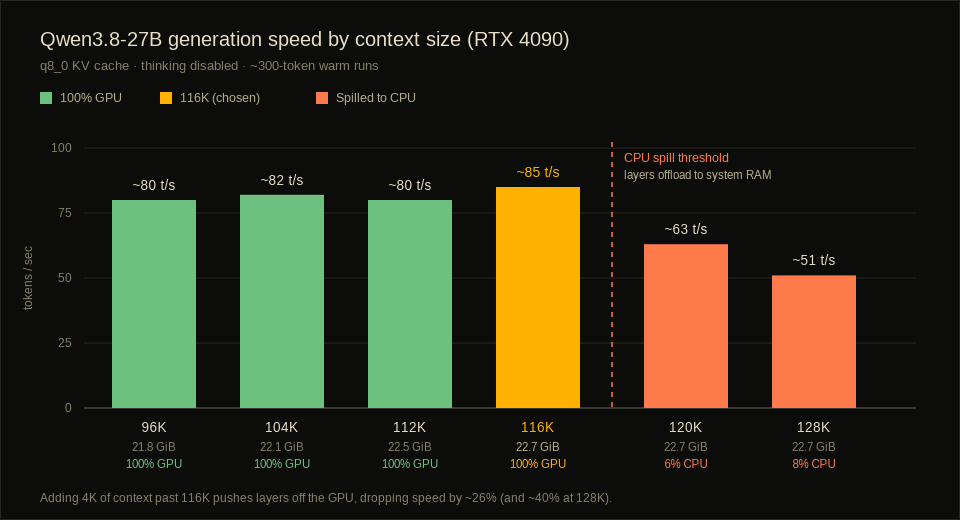
The drop-off is sharp: 116K runs at full speed, while adding just 4K more context costs about a quarter of the throughput. I settled on 116K and updated both the Ollama alias and the Hermes config pin to match.
For comparison, my Hermes post measured Gemma 4 at around 9.6 tokens per second with a 64K context window. The tests were not identical, but Qwen3.8 gives Hermes nearly twice the context at roughly nine times the speed. The built-in MTP drafter accounts for a big part of that speedup; community benchmarks put a 27B model on an RTX 4090 at around 40 tokens per second without speculative decoding, though I did not measure that baseline myself.
I did run into one small surprise during the final rollout: the cleanup step’s ollama rm qwen3.8-128k unloaded the freshly preloaded 116K model, likely because both aliases point to the same underlying weights. That only happens when you rename an alias, and the next request reloaded it back onto the GPU.
Verifying with Hermes
After messaging the Telegram bot, the Hermes logs confirmed that the context pin was working:
WARNING agent.context_pin: model.context_length pins qwen3.8-116k at 118,784 tokens
but the provider advertises 131,072; the pin wins.
The warning suggests removing context_length to use the advertised window, which would be bad advice here since that size spills to the CPU. On the Ollama side, all three chat requests from that conversation returned 200 without triggering a model reload, and ollama ps confirmed the runner stayed on the GPU:
NAME                 SIZE   PROCESSOR  CONTEXT  UNTIL
qwen3.8-116k:latest  18 GB  100% GPU   118784   24 hours from now
What I learned
- Hybrid-attention models change the VRAM math. When only a quarter of the layers keep a KV cache, the cache stops being the main bottleneck, and fixed overheads (vision projector, drafter, compute buffers) matter a lot more.
- Ollama gets slower instead of failing when a model is too big. Always check
ollama psfor100% GPUafter changing context lengths, models, or Ollama versions. - Measure the limit instead of estimating it. My napkin math estimate was off by 12K tokens, and those 12K tokens made a 40% difference in generation speed (for my setup).
- Pin context on both the server and the client.
OLLAMA_CONTEXT_LENGTHand Modelfilenum_ctxare just defaults that any client can override per request. - Render the Helm chart before deploying. I only caught the
cleantag mismatch by reading the generated script. - When
ollama psandnvidia-smidisagree, trustnvidia-smiand check the process list. That is the quickest way to spot a leaked runner holding onto VRAM. - Upgrading a single node’s OS can break assumptions the rest of the cluster still satisfies. The AppArmor signal issue only affected my one Ubuntu 26.04 node, which also happened to be the GPU node.
Closing thoughts
Next up, I want to see how far this same Qwen3.8 setup goes on my 32 GB RTX 5090 workstation with OpenCode, and whether the extra 8 GB of VRAM is enough to unlock the full 256K context window.
I learned a lot getting this to work by having Claude Opus 5.5 explain to me each step and generate the commands for troubleshooting. That being said I see the gap between these self-hostable open-weight models and models from the frontier labs keeps growing. Models like Sonnet 5.5 or GPT 6.2 Sol are inexpensive and vastly more capable for coding or computer related tasks compared to the Qwen 3.8 model. My GPU is quite expensive and uses a lot of power to produce mediocre output from the open-weight model. I still need to find what kind of work I would want to delegate to this setup. For now it just queries the internet every morning to give me a semi-useful summary of local news and local weather. Both of these do not even need AI but I wanted to give Hermes something useful to do.
Related posts
- A private AI stack on Kubernetes
- Running Hermes Agent on Kubernetes with Ollama and Telegram
- Kubernetes NVIDIA GPU setup
- Running LLMs on your hardware
Sources
- Ollama library: qwen3.8
- otwld/ollama Helm chart
- Kubernetes: restrict a container’s access to resources with AppArmor
- llama.cpp
- Hermes Agent local Ollama setup
- Ollama FAQ: Flash Attention and KV-cache quantization
Disclaimer: I used an LLM to assist with this work and post. Opinions expressed are my own.